
One of the reasons I love other services like YouSendIt is that it makes sharing your file easier by allowing you to upload your file, then email the link to the file for someone to download. The problem is that the service isn’t nearly as convenient as Dropbox beyond that single feature.
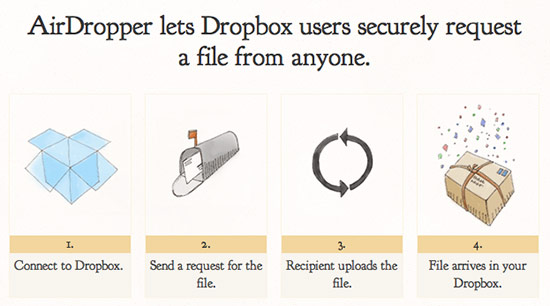
AirDropper for Dropbox makes file requests & sharing easy
Enter AirDropper, a web-based service that connects with your Dropbox account to make transferring files as easy as sending an email. As the image above illustrates, AirDropper works seamlessly with Dropbox to accomplish the task of requesting and sharing your files. First you connect AirDropper to your Dropbox account. Then you fill out our request form with a description of the file you want and how you want to send the request, whether by email or by using a secure upload link. Once the person you’re requesting the file from visits our secure page and uploads the file, we immediately put the file in a subfolder called “AirDropper” within your Dropbox.
Thank You! This tip actually makes Dropbox useful (for me). I don’t need help sharing files with others or syncing multiple machines, but I do need a convenient way to request files from others who aren’t too tech-savvy. This should work nicely.
Binfer is a great option to send large files directly from computer to computer, without uploading to a server. You can send hundreds of files of any size with a simple drag and drop. Binfer will manage the transfers with auto resumes, encryption, notifications etc. Check it out: http://www.binfer.com
I’m just curious to why it can’t be any simpler for the other non-tech savvy people to download the files from Dropbox. I do it all the time. You drop the file in the public folder, generate the link from the dropdown menu (highlight the file and hold control key). Send the link to your clients/peers. All they have to do is clicking on that link and it will start downloading the file automatically. It hasn’t failed me yet.