Delay the launch of your OS X apps, utilities…
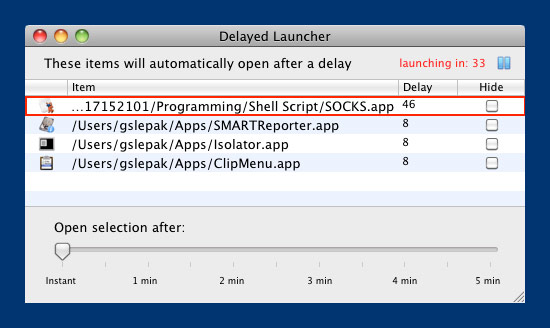
If waiting for all those startup utilities, helpers and applications annoys you every time you boot up/restart your Mac, rejoice in the fact that their is a simple solution.
While you could spend the time to set up an Automator Applescript to set the order and delay time between apps launching, it’s far easier to use DelayedLauncher to do the job.
Delayed launcher allows you to set the order your helpers, utilities and apps launch at boot time, as well as set a delay between each one. This can be quite helpful because OS X attempts to launch all the items in the Startup Items list (in your System Preferences/Accounts tab) at one time – thereby slowing the time until you can actually use your Mac down. In some cases, it can bring your entire system to a crawl until they’ve all launched.





1 COMMENT
[…] few months ago I shared a fantastic app to customize the your login items at startup called DelayedLauncher. Customizing not only your […]
Comments are closed.