Use Tilde to create outrageous Illustrator patterns and shapes

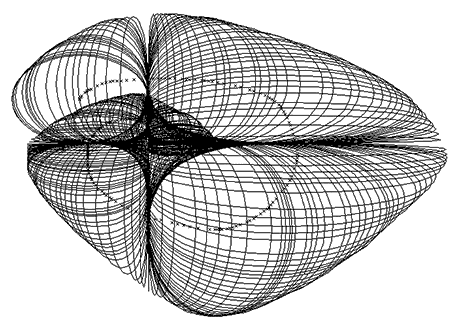
If you're looking for something a little different for a background in Adobe Illustrator, try holding down the Tilde (~) key while dragging out a shape using one of Illustrator's shape drawing tools such as line, circle, square, etc. Holding the Tilde key forces Illustrator to repeat the shapes in rapid fashion as you drag your mouse around the artboard.
ai_tilde-key-trick.png
For fun, I set all the shapes to the same color, then went back and randomly chose a few dozen shapes and made them a different color, then set all shapes to Multiply in the Transparency panel. Try it and you may find yourself busy for an hour or so.

Thanks to BittBox for the tip.



Cool

Pretty cool effect.


Reversing the stack?

Well, this does create a cool effect if you set it to multiply. However, this creates a series of progressively larger shapes, with the largest one being the top of the stack. Is there some way to select them all and have Illustrator reverse the stack order so that the smallest shape is the top layer?


Spirographic Nirvana

The tilde trick was one I learned back in the AI 8 days...that was my first version and I discovered it by accident. Problem with the tilde trick is that you don't have much control over the spacing of the iterations.

Later, then, I became fascinated by the patterns that can be created by using AI's blend functions between lines and shapes, with results that can look like the moirés and the fine filigree patterns on paper currency and certificates. With this method, you have better control of the spacing and number of iterations.

Then, quite by accident about 18 months ago I discovered Excourse's Excentro application. It's a deep, deep application (strap on your higher math helmets!) that was created specifically for creating the Guilloché patterns for bank notes and other security printing:

    "Excentro was originally started in the early 90's as a solution for the emerging Russian security printing market. New promising economy situations asked for a simple, yet not very expensive solution that runs on an industry standard graphic arts platform and can produce the sort of patterns similar to what could be done on mechanical guilloche devices employed by government banknote printing plants. Since then it went through several major updates and features overhauls…"

The beauty thing was that—though the downloadable demo of the 1.67 beta version of Excentro was save-disabled—the authors forgot to disable a toolbar button which allowed the intrepid software junkie to save out a version of their Excourse creations in a format that could be opened in Illustrator. NIIIICCCE!

I haven't tried their full-release version 1.7, but I'm going to take a guess and say that they've since plugged the hole allowing file export.

At US$400, it's not too outrageous a price to pay for an application that does what it does; quite frankly, I don't know of any other application that compares to Excentro.

There's also a "Lite" version that is a mere US$20, and probably worth having a look at if this sort of Spirograhic/moiré/filligree imagery appeals to you. For the hobbyist/explorer it should offer nearly all the control and design capabilities you'd want.

Click the thumbnail below to see a large version of the very first Excentro image I created. What I won't tell you is that I struggled and poked around the app for about 8 hours before I got it sussed enough to make something halfway interesting:

Picture hosted by Pixentral


Not looking for validation, but...

...I'm kind of surprised that out of all the people who must have read this blog entry and the comments that nobody has replied about Excentro.

It's not very well known, but what it does is extraordinary.

Nobody's head was blown wide open—like mine was—after they explored the application!?


Post new comment

The content of this field is kept private and will not be shown publicly.
CAPTCHA
This question is for testing whether you are a human visitor and to prevent automated spam submissions.
9 + 1 =
Solve this simple math problem and enter the result. E.g. for 1+3, enter 4.