Post Tagged with: "Safari"

How to make navigating between Safari tabs suck less

How to make navigating between Safari tabs suck less

Safari Browser

Here's how to make Safari's tab navigation not suck!

With the release of Mac OS X Lion, I switched back to Safari as my main browser. Almost all the extensions I want are available for it, and it’s much less buggy than Google Chrome was beginning to be. But there are a few things that bother me about Safari, one of which is the way you navigate between open tabs.

With every other browser, you can navigate between open tabs by hitting Command + the tab number (#2 would open the second tab from the left, #3 the third, etc.). But with Safari, hitting Command + a number opens the link number of whatever is in your bookmark bar. Handy if you actually have bookmarks in your bookmark bar, but I have nothing but folders. Hitting Command + Shift + } four times to reach the fifth tab from the left is a pain because it requires both hands.

Thankfully, Olivier Poitrey offers SafariTabSwitching, a SIMBL plugin that brings the Command + number feature to Safari. I’ve been using it so long that I actually forgot where I got it from. It’s quite a nice add-on, and I’ve never had a problem using it. The only foreseeable issue is that it is a SIMBL plugin, which Apple doesn’t condone, and could cease to function at any OS update in the future if Apple so chooses – such as OS X Mountain Lion, due later this summer.

05/02/2012 Read More
Save space: search with Google from Safari’s URL bar

Save space: search with Google from Safari’s URL bar

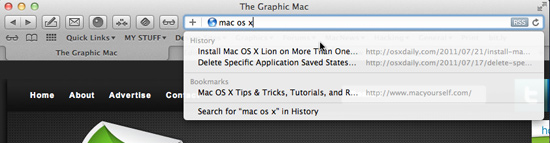
One of the things I love about Google Chrome and Firefox is the ability to do Google searches using the address bar, rather than being forced to have valuable space taken up with a separate search box in the toolbar. It’s one of those few relatively minor things that kept me from using Safari for quite a while.

Search from the address bar

Search from the address bar in Safari

Apparently I wasn’t alone, because a developer has recently released SafariOmnibar (direct download) for Safari for Snow Leopard and Lion. Run the Package installer and you’re good to go. As you can see in the image above, you’ll have the convenience of a single address/search bar.

07/25/2011 Read More
Manage and speed-up downloads with Folx downloader (15% off)

Manage and speed-up downloads with Folx downloader (15% off)

Folx Downloader for MacIf you find yourself having to download large files from the Internet on a regular basis, you’ve probably been frustrated with the fact that browsers tend to come to a crawl when downloading them, and downloading more than one can slow your entire system. And if you’re like me, your download folder can become quite unruly with so many files piling up. I sometimes look at the list of files and wonder what some of them even are.
That’s where Folx comes in. Folx is an easy to use download manager that not only speeds up your normal Internet downloads, but also helps you organize your downloaded files, schedules downloads, and even integrates a full Torrent search and download client.

Folx offers a free version, but readers of The Graphic Mac can get 15% off the Pro version by using the following coupon code at checkout time: GRAPH-MAC-15.

05/18/2011 Read More
Web browser choices have never been better for Mac users

Web browser choices have never been better for Mac users

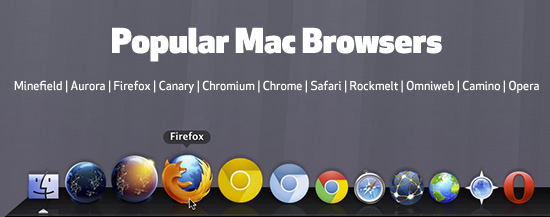
Popular Mac Browsers

Some of the most popular browsers from Mozilla, Google, Apple, and others

When Apple first released Mac OS X a decade ago, Mac users had little choice in web browsers. There was Microsoft Explorer, and Netscape Navigator, and… well, that was it. Soon after we were treated to a few more options, but nothing like we have today.

With Safari shipping on every Mac, and the world-wide popularity of Mozilla’s Firefox, you would think there wouldn’t be much room for competition in the web browser market. But the options have actually never been better for Mac users.

05/16/2011 Read More
Firefox 4 leads Mac browsers in battery life

Firefox 4 leads Mac browsers in battery life

Web browser effects on battery life

Firefox 4 is the best battery life browser for Mac users

Microsoft has released a fairly extensive study of browser use on laptop computers and the effects on battery life. Not surprisingly, IE 9 comes out in the lead overall. As far as Mac browsers go, Firefox 4 takes the crown, followed by Chrome and Safari. Opera brings up the rear in the study.

I’m not sure about the usefulness of the information, as your use of the browser is only one aspect in terms of how long your MacBook’s battery lasts. And how many people use enough Watts of power just surfing the web? But the information provided is interesting nonetheless.

03/31/2011 Read More
Web developers and designers: How fast does your page load?

Web developers and designers: How fast does your page load?

loads.in

loads.in is a great site to test your web page load speed

In a day and age where a good majority of web surfers have high-speed Internet, web developers and designers still must concern themselves with page loading speed. Javascript, JQuery, Java, Flash, and large images can slow the load time of any given page. The best way to test the speed of your web pages is to use an off-site app to test it.

Loads.in is a great site to do just that. You simply type in the URL of your web page and wait a few seconds for the test to run. Once completed, a display of average load times is provided. From there, you can select cities in various countries from a list and retest your page. Additionally, you can choose to use IE, Safari, Chrome, or Firefox to run the test.

03/24/2011 Read More
Countdown to IE6 extinction: Even Microsoft wants it!

Countdown to IE6 extinction: Even Microsoft wants it!

Microsoft is behind the IE6 countdown site, which endeavors to let the world know just how many (or few, as the case is) IE6 users are still out there – which currently stands at a mere 12 percent of the web browsing population.

IE6 use worldwide

IE6 users account for less than 3 percent of U.S. browsers

As a web designer or developer, you’re probably sick and tired of working around the fact that your company wants IE6 compatibility with their website. But my question to you is, WHY do you continue to do it?

Unless your primary audience lives in China (34.5 percent) or South Korea (24.8 percent), you have little reason to care about IE6 users – which are probably people who don’t care about your site to begin with. In fact, half of that 12 percent can probably be attributed to servers or computers not actively used by humans.

Here in the U.S., less than 3 percent of the web browsing population uses IE6, and you can safely assume that those people probably are on dial-up connections, or do little surfing to begin with. After all, wouldn’t you grow tired of seeing all the “sorry, this doohicky site won’t work with IE6″ error messages and just click that upgrade button eventually if you had a nice speedy cable connection? There’s most likely a reason they aren’t upgrading.

Just stop worrying about IE6 users and move on. The web browsing public is much more savvy today than they were just a few years ago. If they’re truly interested in your site, they WILL upgrade their browser.

To help encourage browser upgrades, the IE6 Countdown site even offers a simple HTML code you can place in the header of your HTML that pops up a banner encouraging an IE6 visitor to upgrade.

03/07/2011 Read More
Add Twitter capability to Safari with Ostrich extension

Add Twitter capability to Safari with Ostrich extension

By now it should be no secret that you can add extensions to Apple’s Safari web browser. One new extension allows you to read and send Tweets with the click of a button.

Ostrich is accessed through a button in your browser bar which drops down an overlay window containing Tweets from your Twitter stream. The icon also notifies you of the number of unread Tweets with a red badge.

Ostrich for Safari

Ostrich adds Tweeting to Safari with the click of a button

One of the few features of Ostrich is the ability to automatically add a link to the page you’re currently on to a new Tweet, which you access by clicking the plus button in the upper right corner. And that’s what brings me to the single problem I have with this extension. When you click that plus button, a new window is spawned with a tiny text entry box; a royal pain in the behind, if you ask me. To be fair, the Ostrich feedback page does indicate that the developer is working on adding text input without spawning a new window.

Ostrich isn’t for everyone. Twitter power-users will want to avoid it due to it’s simplistic interface and lack of extra features. But if you’re only the occasional Tweeter, or you own a Macbook with a smaller screen and are trying to save screen space, Ostrich might fit the bill.

07/19/2010 Read More