Post Tagged with: "PDF"

Fraction to decimal conversion chart

Fraction to decimal conversion chart

Fraction to decimal conversion chart

Simple conversion chart

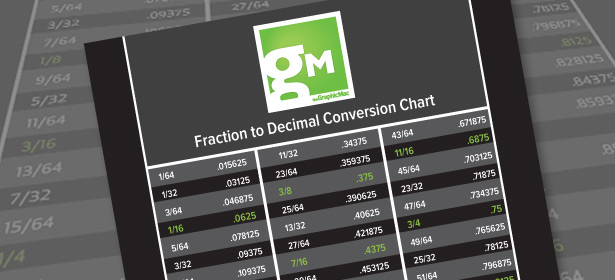
Life was much easier back in the days when everyone used Points and Picas for measurements in the design field – most readers probably have probably never used them, but I assure you it was much easier. Inches is a ridiculous measurement system, particularly in our business. Has anyone ever been told to provide a 6 59/64 wide ad or poster? For years I’ve used this fraction-to-decimal chart, keeping it tacked to the wall next to my monitor for quick reference.

You can download the free fraction-to-decimal chart here.

04/24/2012 Read More
Print separations from InDesign CS5 and Snow Leopard

Print separations from InDesign CS5 and Snow Leopard

InDesign CS5A friend recently asked what happened to the ability to export color separations from Adobe InDesign CS5 to a PDF using custom page sizes. I’ve never heard of or had the need to do this, so I was of little help. But for whatever reason, I was able to do it because I still had the generic Postscript PPD installed. The only thing I could think of was that I still had CS4 installed on my Mac, and the ability to do it remained in CS5 because of that.
In any case, my friend discovered the work around, and shared with me where he found it. Russell Viers offers the solution, that requires little more than a quick PPD download and install. Again, I’m not sure why you would want to do this because your printer generally handles this in-RIP at their printing facility. You really need to know what you’re doing when you enter the settings.

02/28/2012
Adobe Reader for iPhone and iPad

Adobe Reader for iPhone and iPad

Adobe Reader for iOSJust like Adobe Reader on the desktop, now you can use your iPhone, iPad or iPod Touch to quickly view and interact with the widest range of PDF file types – including PDF Portfolios, password-protected PDF documents and even Adobe LiveCycle rights-managed PDF files with Adobe Reader for iOS.

Using Adobe Reader for iOS, you can open and view PDF files from email, on the Web or from any application that supports the “Open In” function. Through its highly intuitive user interface, Adobe Reader provides you with an efficient PDF viewing experience regardless of the iOS device you happen to be using.

But that’s not all. You can also interact with PDF files in a number of ways including searching for specific text in the PDF or using bookmarks and page thumbnails to quickly navigate to different sections in the PDF file. And should you need a hard copy, you can also print the PDF wirelessly using iOS AirPrint.

I’ve been using Adobe Reader on my iPhone 4 for the last week or so, and found it to work extremely well. Previously I was using a 3rd party app, but it wasn’t nearly as fluid or easy to use as Adobe’s own solution.

10/25/2011 Read More
Recovering PDF passwords: what to expect

Recovering PDF passwords: what to expect

Recover PDF PasswordIt’s not often that I get a password protected PDF file that I don’t get the password for. I’m not talking about a restricted PDF that doesn’t allow you to print or copy text out of, those are easy to work around. I’m referring to the obnoxious graphic artist at Client X who no longer works there who set the security settings on an important PDF to require a password just to open. That guy is a jerk, but that’s for another time. How to get into the PDF is the immediate dilemma we need to deal with.
Prior to Mac OS X Leopard, you could open the PDF in Apple’s ColorSync Utility – a simple workaround that obviously got missed by someone at Apple. Unfortunately, that doesn’t work anymore. So I decided to give Eltima’s Recover PDF Password ($40 minus 15% off if you use the offer code GRAPH-MAC-15 at checkout time) app a try. It’s the only Mac solution I came across that not only can bypass the no-print restrictions, but the more annoying “password just to open issue.” Plus, I’ve reviewed a few of Eltima’s apps before and found them to work pretty darn well. Below are my findings in my initial tests.

07/18/2011 Read More
Free Adobe Creative Suite printing guide available for download

Free Adobe Creative Suite printing guide available for download

Adobe Creative Suite 5 Printing Guide

The Adobe Creative Suite 5 Printing Guide is available for download

Many users of Adobe’s Creative Suite software are unaware that Adobe provides an excellent printing guide in PDF format to aid in learning the ins-and-outs of successful commercial printing using the Creative Suite apps

The guide is an excellent resource for new users, serving as a training manual, as well as a brush-up for experienced users. The guide covers a wide-range of printing-related topics in Adobe InDesign, Photoshop, Illustrator and Acrobat. The free Creative Suite 5/5.5 Printing Guide is a 22MB download.

07/12/2011 Read More
Email archiving in PDF format for the Mac

Email archiving in PDF format for the Mac

Email Archiver

Email Archiver creates PDFs of all your emails

There are plenty of reasons for wanting to permanently archive your emails, not the least of which is making sure you have a record of agreements you’ve made with clients. Whatever your reason for wanting to archive your emails, there is a simple solution for Mac users that ensures future accessibility.

Email Archiver creates a PDF file of each and every email in Mac OS X’s Mail application. The advantage of a PDF archive is that they are compatible with so many applications, thus making it future proof. The app simply scans all (or some) of your mailboxes and folders in Mail and creates a PDF of the mail, including a full email header for searching purposes, and creates PDFs of each email in hierarchical folders in the Finder location of your choice.

Email Archiver normally costs $9.99, but is free right now on the Mac App Store.

05/17/2011 Read More
Don’t fear the white lines in your PDFs created by InDesign

Don’t fear the white lines in your PDFs created by InDesign

InDesign CS5You’re working on a brochure under a tight deadline, and upon opening the PDF you just exported from Adobe InDesign, you notice thin white lines around certain objects. Don’t miss your deadline spending too much time troubleshooting the InDesign file. More often than not, those white lines are simply a display glitch in the PDF caused by transparency flattening in the export process.

If you’re concerned, you can check your file in two ways. The first method is to simply open the PDF and zoom in and out – if the thin white line disappears when you zoom in and out, it’s just a display glitch.

The second method is to just run InDesign‘s Package command (Command + Option + Shift + P); when the report dialog appears, make sure you have no RGB images in use. When RGB images overlay CMYK images, transparency flattening problems can occur. If this is the case, then you definitely should convert those RGB images to CMYK before exporting your file as PDF.

03/30/2011 Read More
Adobe InDesign turns ten: Free e-book documenting its history and future

Adobe InDesign turns ten: Free e-book documenting its history and future

InDesignTo celebrate the 10th anniversary of Adobe InDesign, the layout tool for print and digital publishing, Adobe is releasing a commemorative book titled “Page by Page: 10 Years of Designing with Adobe InDesign” that highlights the product’s evolution and features designers who have helped make InDesign a success.
Adobe InDesign celebrates 10 years

InDesign celebrates 10 years with free e-book download

Designed to provide an inside look at the company’s stewardship in moving publishing from print to digital solutions, the 10th anniversary book examines the role of InDesign and the InDesign Family in transforming the layout and editorial workflow at agencies, corporate publishers and traditional publishers worldwide. The book also details the evolution of InDesign from its public debut in 1999 to today and includes sample work created by designers for publications such as Marie Claire, publishers like Condé Nast, and cutting edge design agencies such as Modern Dog and Mucca Design.

03/15/2010 Read More